

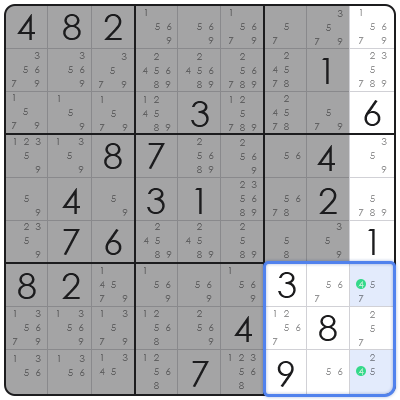
Building a Sudoku game in JavaScript represents a foundational exercise in web development, leveraging core programming concepts to create an interactive and engaging user experience directly within the browser. This endeavor involves not just rendering a grid, but implementing intricate algorithms for puzzle generation, validation, and user interaction, providing a comprehensive challenge for developers. It addresses the primary problem of creating dynamic, logic-driven web applications that demonstrate problem-solving and algorithmic thinking. From a framework perspective, undertaking how to make a sudoku game in javascript offers invaluable insights into DOM manipulation, event handling, and state management without the abstraction layers of popular front-end libraries. This direct engagement fosters a deeper understanding of how web applications function at their core, making it an excellent project for both aspiring and experienced developers looking to solidify their JavaScript proficiency and apply computational logic to visual interfaces. In practical application, the process of creating a Sudoku game in JavaScript also hones skills in user interface design and logical error handling, crucial aspects of modern software development. This article will deconstruct the essential components, algorithms, and best practices involved, offering a definitive guide to architecting a robust and performant Sudoku game entirely on the client-side.
Core Algorithmic Foundations for Sudoku Generation
Understanding the core algorithmic foundations for how to make a sudoku game in javascript is paramount for generating valid and engaging puzzles. The backtracking algorithm is the most widely adopted method for creating Sudoku grids, systematically attempting to place numbers in cells while adhering to Sudoku’s fundamental rules. This recursive approach explores potential solutions, and if a number leads to a contradiction, it ‘backtracks’ to the previous cell to try a different number, ensuring a solvable and correctly formed grid.
Based on structural analysis, the backtracking process begins with an empty 9×9 grid, randomly filling cells while continuously checking for rule violations (no duplicate numbers in rows, columns, or 3×3 subgrids). Once a full, valid grid is generated, cells are then iteratively removed to create the puzzle, with a critical step involving a solution counter to ensure the resulting puzzle has a unique solution. This careful balance of removal and validation is what determines the puzzle’s difficulty and solvability.
Beyond generation, efficient validation logic is crucial for both puzzle creation and user input. This involves creating helper functions to quickly check if a number is valid in a given cell based on its row, column, and 3×3 box. Optimizing these checks prevents performance bottlenecks, especially during the intensive puzzle generation phase, contributing to a smoother user experience and a more responsive application when players are interacting with the board.
Step-by-Step Implementation: Building Your JavaScript Sudoku
To begin how to make a sudoku game in javascript, the initial step involves setting up the basic HTML structure and CSS styling that will house the Sudoku grid and user interface elements. This includes a main container, the 9×9 grid layout (often achieved with CSS Grid or Flexbox), and elements for user controls like ‘New Game,’ ‘Solve,’ or ‘Hint’ buttons. A clean, responsive design is vital for a good user experience.
The next crucial phase in how to make a sudoku game in javascript is board representation and initialization in JavaScript. A 2D array (e.g., `let board = Array(9).fill(0).map(() => Array(9).fill(0));`) is typically used to represent the Sudoku grid’s state, storing the numbers in each cell. This array serves as the single source of truth for the game’s logic, independent of the visual representation on the web page. Functions for initializing the board with empty values and later populating it with a generated puzzle are essential.
Implementing the puzzle generation algorithm, primarily backtracking, comes next. This involves writing recursive functions that attempt to fill cells one by one, ensuring each placement is valid according to Sudoku rules. Once a full, valid board is generated, a ‘digging’ process removes a certain number of cells to create the puzzle, with more removed cells generally corresponding to higher difficulty. The key here is to ensure the puzzle still has a unique solution after cells are removed, often by running a solver to count solutions.
Rendering the board to the DOM is the subsequent step, dynamically creating HTML elements (e.g., `div` elements for cells, `input` fields for editable cells) based on the JavaScript `board` array. Event listeners are then attached to these input fields to capture user entries. User interaction involves handling keyboard inputs, validating them in real-time or upon submission, and updating both the visual display and the underlying JavaScript `board` array. This ensures synchronization between the user’s view and the game’s internal state.
Finally, enhancing the game with features like solving functionality, hint mechanisms, and difficulty level selections adds significant value. A solver can be implemented using a similar backtracking algorithm, but instead of generating, it finds a solution for an existing puzzle. Hints can reveal a single correct number, while difficulty levels are controlled by varying the number of initial cells ‘dug out’ from the generated board, requiring careful balancing to maintain puzzle solvability and uniqueness.
Comparative Analysis: Sudoku Implementations in Software Development
When considering how to make a sudoku game in javascript, a comparative analysis against other implementation approaches reveals distinct advantages and trade-offs. Compared to a purely server-side generated Sudoku, a client-side JavaScript implementation excels in responsiveness and scalability. Client-side generation reduces server load significantly, as puzzle creation and validation occur directly in the user’s browser, leading to immediate feedback and a more fluid user experience without constant server requests. However, server-side generation might offer more robust security against cheating or provide more complex, pre-computed puzzles.
From a framework perspective, building a Sudoku game with vanilla JavaScript offers unparalleled control and a deep understanding of browser APIs, contrasting with implementations using frameworks like React, Vue, or Angular. Vanilla JavaScript provides a direct and unopinionated approach, which can be less complex for smaller, contained projects and ideal for learning fundamental concepts. Frameworks, while introducing an initial learning curve and more boilerplate, offer structured state management, component reusability, and larger ecosystem support, which can be beneficial for scaling into more complex game applications or integrating with broader application architectures.
Considering browser compatibility and performance, a well-optimized vanilla JavaScript Sudoku game can run efficiently across a wide range of browsers, leveraging standard DOM manipulation. Modern frameworks often come with their own performance optimizations and virtual DOM concepts, which can be advantageous for very large or frequently updating interfaces. However, the overhead of the framework runtime itself can sometimes lead to larger bundle sizes and marginally slower initial load times compared to a lean, vanilla JavaScript implementation.
Common Pitfalls and Professional Solutions in Sudoku Development
One frequent mistake when learning how to make a sudoku game in javascript is inefficient puzzle generation, often leading to long loading times or even browser freezes. This usually stems from an unoptimized backtracking algorithm that explores too many invalid paths or lacks proper early exit conditions. A professional solution involves implementing memoization or caching for common validation checks, and critically, optimizing the ‘digging’ process by ensuring the puzzle remains uniquely solvable after each cell removal, rather than brute-forcing many generations.
Another common pitfall is inadequate validation logic for user input, resulting in an unclear or frustrating experience for the player. Players need immediate feedback on incorrect entries, rather than only validating the entire board upon completion. To address this, implement real-time validation for each cell entry, highlighting incorrect numbers or cells without obstructing the game flow. This can be achieved by checking the number against its row, column, and 3×3 box as soon as it’s entered, providing visual cues like red borders or warning messages.
Finally, a significant challenge in how to make a sudoku game in javascript is managing the user interface responsiveness and performance, particularly as the number of DOM manipulations increases. Frequent re-renders or updates can lead to jankiness. Professional advice includes batching DOM updates using techniques like `requestAnimationFrame`, debouncing input events to limit the frequency of function calls, and strategically updating only the necessary parts of the grid rather than re-rendering the entire board. Employing a virtual DOM concept, even if rudimentary, can greatly enhance performance.
Frequently Asked Questions About JavaScript Sudoku Development
Q: What is the best algorithm for generating Sudoku puzzles? A: The backtracking algorithm is widely regarded as the most effective and common method for systematically generating valid Sudoku puzzles with various difficulty levels.
Q: How can I ensure my Sudoku puzzle has a unique solution? A: After generating a full grid and removing cells to create the puzzle, run a separate solver algorithm to count the number of valid solutions. If it finds more than one, revert the last cell removal or re-generate.
Q: Is plain JavaScript sufficient, or should I use a framework like React? A: For learning fundamental concepts and gaining direct control over the DOM, plain JavaScript is ideal. For larger, more complex applications or team collaboration, a framework can offer structural benefits.
Q: What are key performance considerations for a web-based Sudoku game? A: Efficient DOM manipulation, optimized puzzle generation algorithms, and minimizing unnecessary re-renders are crucial for a smooth and responsive user experience.
Q: How do I handle different difficulty levels in a Sudoku game? A: Difficulty is primarily controlled by the number of cells initially revealed; fewer revealed cells generally equate to a higher difficulty, provided the puzzle retains a unique solution.
In conclusion, the journey of how to make a sudoku game in javascript is a comprehensive exercise in full-stack web development principles, albeit client-side focused. It solidifies understanding of algorithms, data structures, DOM manipulation, and user experience design. The strategic value extends beyond simply creating a game; it equips developers with critical problem-solving skills and a robust foundation for building more complex interactive web applications, demonstrating a profound grasp of web engineering best practices for future industry challenges.